
Recipient Time Zone in Marketo | Marketo for Beginners | E for Email
Why Your “10 AM Send” Doesn’t Mean 10 AM Everywhere (and How Marketo Decides)

Ever wondered why two people open the same email at completely different times, even though you scheduled one send?
That’s Recipient Time Zone doing its thing. Quietly. In the background. And when it works, you don’t notice it at all.
Over 3+ years running global campaigns in Marketo, I’ve learned this feature isn’t “smart” by default. It’s only smart if you respect its rules (and if your data cooperates, which… we’ll come back to).
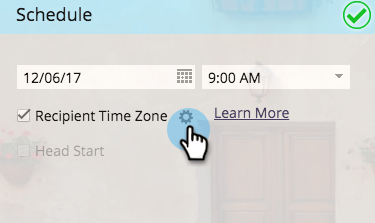
What Recipient Time Zone actually does
Recipient Time Zone tells Marketo to deliver emails based on each person’s local time, not your subscription’s time zone. Instead of one global blast, Marketo waits and sends when it’s, say, 10 AM for them.
London gets it at their 10 AM.
Sydney gets it at their 10 AM.
New York gets it at their 10 AM.
Simple idea. Powerful impact.
But only if Marketo knows where people actually are.
How Marketo figures out a person’s time zone
Marketo doesn’t magically know anyone’s location. It builds the time zone from available person data.
First, it checks structured fields like city, state, country, or zip code. If those aren’t usable, it tries inferred location data. And if that still doesn’t work, Marketo falls back to your subscription’s default time zone.
Pause here, because this part is misunderstood.
Wait, does that mean everyone suddenly gets the email at the same time?
Not exactly. It means Marketo stops personalizing and treats those records as if they live in your system’s time zone.
So Recipient Time Zone never blocks a send. But dirty data quietly turns it into a normal scheduled send.
Most “Recipient Time Zone bugs” I’ve investigated weren’t bugs at all. They were data problems wearing a scheduling costume.
The 25-hour rule (and why it exists)
You’ll see this number mentioned, but rarely explained.
If you want Recipient Time Zone to work cleanly across all regions, you need to schedule the email at least 25 hours in advance.
Why 25?
Because Marketo needs time to check, for every single recipient, whether the scheduled send time has already passed in their local time zone. If you schedule too close, some people are already “in the future.”
And Marketo doesn’t guess. It asks you what to do.
Visualizing what’s actually happening
Think of the world split into time-zone slices.
When you schedule an email far enough ahead, Marketo walks through each slice and says, “Okay, when it’s 10 AM there, send it.” Clean. Predictable.
When you schedule late, some slices have already passed 10 AM. Marketo stops and asks, “Do you want me to wait until tomorrow for them, or just send it anyway using your system time?”
That decision is where campaigns quietly diverge.
When you schedule too late (the gear icon moment)
If your email is scheduled less than 25 hours in advance, Marketo shows a gear icon and prompts you to choose how to handle recipients who’ve already missed the local send time.
This is where people click quickly and regret it later.
Let’s break the options down properly.
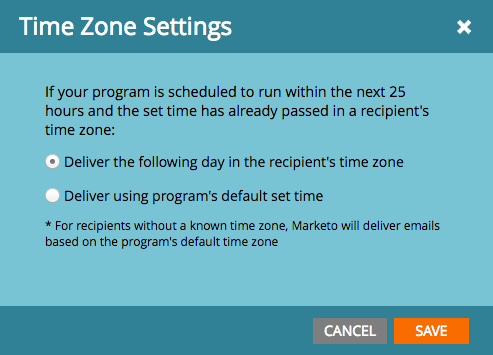
Option 1: Deliver the following day in the recipient’s time zone
This option protects local experience.
Example: you schedule an email for Monday at 10:00 AM. A recipient in another time zone has already passed 10:00 AM by the time you schedule it. Marketo waits and delivers the email to them on Tuesday at their local send time.
Option 2: Deliver using the program’s default time
This option protects campaign timing, not inbox experience.
Using the same example, if your subscription time zone is PDT America/Los Angeles, those recipients will receive the email based on PDT. That might be late night or early morning in their local time.
Sometimes that’s acceptable. Product launches. Urgent announcements. Legal notifications.
A pattern I see again and again
Teams enable Recipient Time Zone, schedule an email for “tomorrow morning,” and assume everything is handled.
Then Asia-Pacific engagement looks off. Or EMEA opens spike at odd hours.
Almost every time, the root cause is the same: late scheduling, incomplete location data, or a fallback choice made under pressure.
Recipient Time Zone isn’t set-and-forget. It’s set-and-respect-the-constraints.
When Recipient Time Zone is the right tool
It shines for global newsletters, nurture emails, and educational campaigns where inbox timing influences engagement.
It’s risky for last-minute sends, emergency communications, or situations where everyone must receive the email at the exact same moment.
Same feature. Different outcomes. Depends on how you use it.
The quiet truth
Recipient Time Zone doesn’t magically increase opens. It just removes bad timing from the equation.
But only if you give Marketo enough notice.
Only if your data is reliable.
Only if you understand the fallback behavior before you need it.
Rush it, and Marketo will still send the email. It just won’t behave the way you think it is.
Written by Mohan — Email Marketing, Marketo, and Marketing Automation